Your health journal Visits, symptoms, and what came after.

Log appointments, symptoms, and prescriptions in one place. FichaMed is 100% offline and keeps everything on your phone, with no cloud and no account.

  • No cloud
  • No ads
  • Works offline
  • One timeline Appointments, symptoms, medications, measurements
  • The return visit A reminder before it and after it
  • Ready for the doctor A summary per specialty, exported as PDF
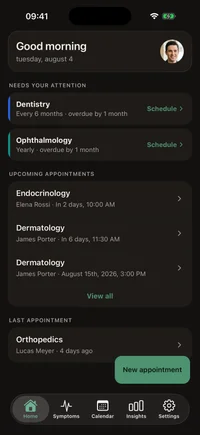
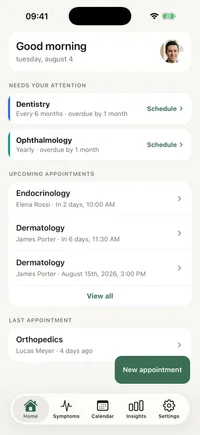
FichaMed home screen on iPhone: specialties that need attention, upcoming appointments, and the symptoms tab
Scroll

Benefits

The details you forget are the ones the doctor asks about.

When the symptom started, what the last specialist said, which prescription came before. FichaMed keeps all of it in one place and hands control back to you.

  1. Remember that prescription from five years ago?

    Stop relying on memory. Past visits, your notes, and a photo of the prescription stay recorded and within reach when you need them.

  2. “How long has this been going on?”

    Answer with a date instead of a guess. Every symptom entry keeps its day, how strong it was, and your note, so the timeline speaks for you.

  3. Give your doctor the full history.

    Arrive with everything organized in hand. Less “I don’t remember” and more time for what actually matters.

Why FichaMed

Your health data belongs to you. And no one else.

While other apps send your health data to the cloud, FichaMed keeps everything inside your phone. Your records never leave the device unless you decide to share them.

It stays on your phone

Your history is saved on your device, not on our servers. We cannot read what you record, because there is nowhere to send it.

Learn more

Privacy first

Your records sit behind your phone’s own security, and app lock adds your passcode or biometrics on top. There is no company server to breach, because nothing is sent to one.

Walk into the appointment prepared

Open the summary for a specialty and every visit, symptom, and note from it comes together. Share it as a PDF and talk through your history without relying on memory.

Learn more
  • Works offline

    The whole app works without internet. In the waiting room, on the subway, or anywhere with no signal, your history is right there.

  • Track how you actually feel

    Log a symptom in seconds, with how strong it was and a note. The timeline shows what keeps coming back and what is worth mentioning at the next visit.

    Learn more
  • Reminders before and after

    A heads-up before each appointment, and a nudge afterwards to write down what was said while it is fresh. Reminders stay on your device.

    Learn more

How an appointment actually goes

From the reminder to the record.

Three moments, one journal. Nothing is retyped, because it was written down the first time.

  1. Before the appointment

    Arrive with the questions ready.

    What you felt, what you take and what changed since the last visit is already written down, so the ten minutes you get are not spent reconstructing dates.

    • Symptom log with severity and notes
    • Active medications, with dose and frequency
    • Weight, blood pressure and blood sugar over time
  2. At the appointment

    Have the history in your hand.

    Past visits, who saw you and what for, grouped by specialty instead of scattered across folders and chat threads.

    • Visits by specialty and by professional
    • The specialty summary, exported as PDF (Pro)
    • Prescription photos kept with the visit (Pro)
  3. After the appointment

    Write it once and move on.

    Log what was said and the next date while it is fresh. The phone schedules the reminder for both.

    • Notes on the visit that just happened
    • A post-visit reminder to log the outcome
    • The next appointment on the calendar (Pro)

In practice

What using it day to day looks like.

Two screens you will open most weeks.

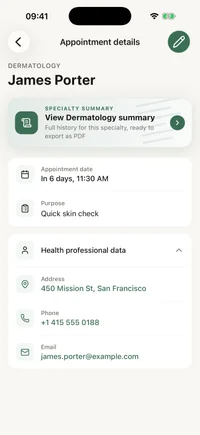
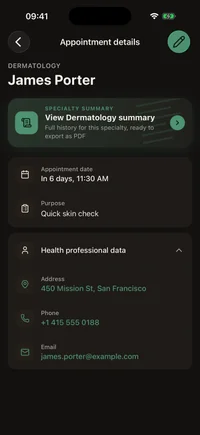
FichaMed appointment detail screen showing the specialty, the professional’s name, the date, and personal notes.

Every visit with everything that matters

Specialty, professional, date, and the clinic phone number on one screen. Your notes sit right beside them, so you walk into the next appointment knowing exactly what was said in the last one.
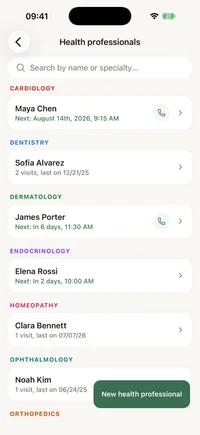
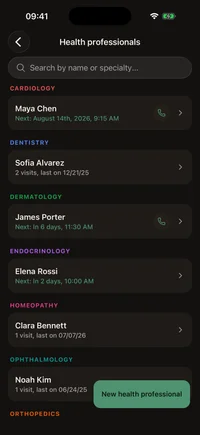
FichaMed list of health professionals, each with a specialty and contact details.

The contact list that never gets lost

Phone, email, and address for each professional, next to their specialty. Need to reschedule? The number is one tap away, not buried in a two-year-old message thread.

Trust & compliance

International privacy standards

FichaMed is built so your health data stays on your device. We align our practices with major frameworks, including LGPD (Brazil), GDPR (EU), and HIPAA-aligned principles, so users worldwide get a consistent, privacy-first experience.

Global standards

  • LGPD

    Brazil national law

  • GDPR

    EU data protection

  • HIPAA

    US health privacy principles

The bigger picture

Years of appointments on a single screen.

Once your history is organized, it starts answering questions a pile of paper never could.
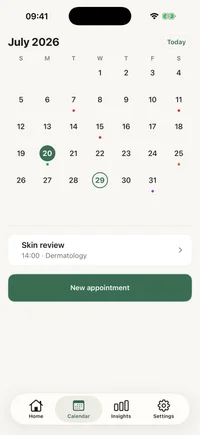
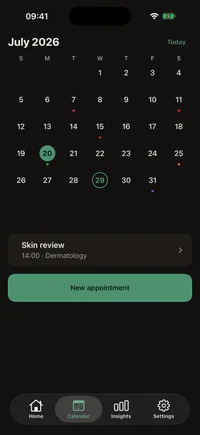
FichaMed monthly calendar with appointment days marked and the selected day’s schedule below.

The whole month at a glance

The visits already behind you and the ones coming up, laid out on the month grid. Tap a day to see what happened, or what is next.
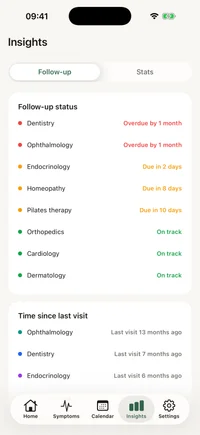
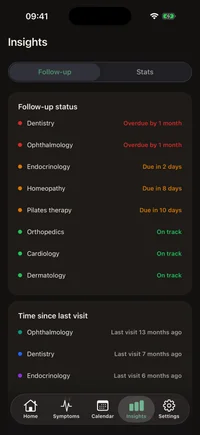
FichaMed insights screen with a monthly appointment chart and time since the last visit per specialty.

What your history reveals

How many visits per month, how long since you last saw each specialty, the summary of the year. The kind of pattern a list never shows.

"Health data is the most sensitive information a person can possess. It should never be a product, it should be yours alone.

- the FichaMed principle

Plans

Start free. Subscribe if the app earns it.

The free tier is not a trial: appointments, symptoms, medications and measurements are free, with no cap on how much you keep. Pro opens the rest: the calendar, the insights, the specialty summary in PDF, more than one profile and the app lock.

Free

Start here

The whole journal for one person, with nothing to sign up for.

  • Appointments and health professionals, with no numeric cap
  • Symptoms: catalog, dated logs with severity and notes, timeline
  • Medications: dose, frequency, start and end dates
  • Measurements: weight, blood pressure and blood sugar, with chart and history
  • Predefined specialties
  • Reminders for upcoming appointments, with a fixed lead time
  • One profile
  • On-device backup export and import

No account, no card, no ads.

FichaMed Pro

Everything unlocked

Lifts the limits of the free tier and opens the whole follow-up.

  • Calendar tab: month view and day detail
  • Insights: appointment and symptom stats, follow-up status
  • Specialty summary with PDF export
  • More than one profile, for the family you look after
  • Prescription photos kept with the visit
  • Custom specialties and archiving of professionals
  • App lock with biometrics or passcode
  • Reminder timing you choose, plus search and filters on the list
  • Automatic iCloud backup on iOS

Subscription through the App Store and Google Play.

The price is shown by the App Store and Google Play in your own currency, and the subscription is managed there. The free tier has no numeric cap: what Pro adds is the wider view, the export and more than one profile. Your health data is never sold, on any plan.

FAQ

Frequently asked questions

Everything you need to know about how FichaMed protects and organizes your data.

Is FichaMed compliant with GDPR and LGPD?
FichaMed is designed as a local-first health organizer: your clinical data stays on your device and is not processed on FichaMed company servers for storage. That architecture supports GDPR and LGPD expectations around data minimization and your control. Compliance also depends on how you use the app and your device settings; always review our Privacy Policy for details.
How is my data protected on the phone?
Your health records are stored in a local database on your device, protected by the same system encryption and lock screen that protect the rest of your phone. FichaMed Pro adds app lock, so opening the app asks for your passcode or biometrics. There are no keys on our side because we do not host your medical content in the cloud.
How do backups work if the app is offline?
FichaMed does not run its own cloud sync for free users. You can export and import a backup on-device at any time. On iOS, automatic iCloud backup is a Pro feature and still lands in your own iCloud Drive, not on FichaMed servers. OS device backups (if you enable them) also remain under your Apple or Google account.
Is FichaMed free?
Yes for day-to-day use: appointments, health professionals, symptom tracking, reminders, and one profile stay free, with no ads and no limit on how many records you keep. FichaMed Pro unlocks the calendar, insights, the specialty summary with PDF export, multiple profiles, prescription photos, custom specialties, app lock, configurable reminder timing, appointment search and filters, and automatic iCloud backup on iOS. Your health data is never sold on any plan.
Will I lose data if I change phones?
If device backup is enabled, you can restore FichaMed data on a new phone with the same Apple ID or Google account. Without a backup, data remains only on the original device.
Does FichaMed work without internet?
Yes. Recording, viewing, reminders, and PDF export all work fully offline. Network access is only needed for store updates or optional services you explicitly use outside the app.
Does FichaMed store my data on your servers?
No. FichaMed does not use cloud servers to store your medical history, prescriptions, or exams. Your health content remains on your device unless you choose to back it up through your OS.
Is my data the same on iPhone and Android?
The app offers the same privacy model on both platforms: local storage protected by the device itself. Feature details may vary slightly by OS (automatic iCloud backup is iOS only), but your data is never centralized on FichaMed servers.
What diagnostic data do you collect?
We may receive anonymized crash and performance diagnostics through the app stores. Technical error telemetry (e.g. Sentry in the EU) can include device and stack information but not your health records or personal medical content.
Who can access my medical records in FichaMed?
Only people with access to your unlocked device (or your exports) can see your data. FichaMed does not have a dashboard or employee access to your health entries.
How does app lock and biometrics protect me?
App lock is a Pro feature. It uses the system passcode or biometrics APIs. FichaMed does not store your biometric template; the OS verifies you and unlocks access to the local database.
How do I export my health history to PDF?
Open the summary for a specialty, pick the fields you want, and share it as a PDF with a doctor or keep an offline copy. The specialty summary is a FichaMed Pro feature; the file is created on your device and is not uploaded to our servers.
Do I need an account to use FichaMed?
No. There is no FichaMed account and no login screen. You install the app, pick a language and start writing; the records live in a database on your own phone.
Can I keep records for more than one person?
The free tier covers one profile. FichaMed Pro adds more profiles, so your own history and, say, a parent you look after stay separate on the same phone.
What can I log besides appointments?
Symptoms with severity and notes, medications with dose and frequency, and measurements of weight, blood pressure and blood sugar with a chart and history. All of that is on the free tier.
Do I have to enter my whole history before it is useful?
No. Start with the next appointment and the medications you take today. Older visits can be added whenever you have the dates at hand.

Get the app

Start your health journal today.

Two minutes of typing today is the answer to every question your doctor asks next year.
  • No cloud
  • No ads
  • Works offline